
Your Test Strips 4 Money Account Has Been Rebuilt: What Changed
The short answer: Your Test Strips 4 Money account now makes it easier to see what you sent, where your shipment is, how much you were paid, and what you need to do next. You can also repeat an earlier shipment, update an unshipped order, and get through checkout with fewer steps.
We rebuilt the account area in September and October 2026 around one goal: make selling your unused diabetic supplies easier to follow.
You do not need to learn a complicated system. Log in to your account, and your Home page will show you where things stand.
1. A Home page that gives you the answer first
Your Home page now shows:
- how much we have paid you in total;
- how many shipments are on the way to us;
- any shipment that is still waiting on you;
- your saved payment choice; and
- your special prices, if you have any.
An order that has not shipped yet includes the action you need, such as Download my label or Show my QR code. A shipment in transit includes a progress bar and a link to USPS tracking.
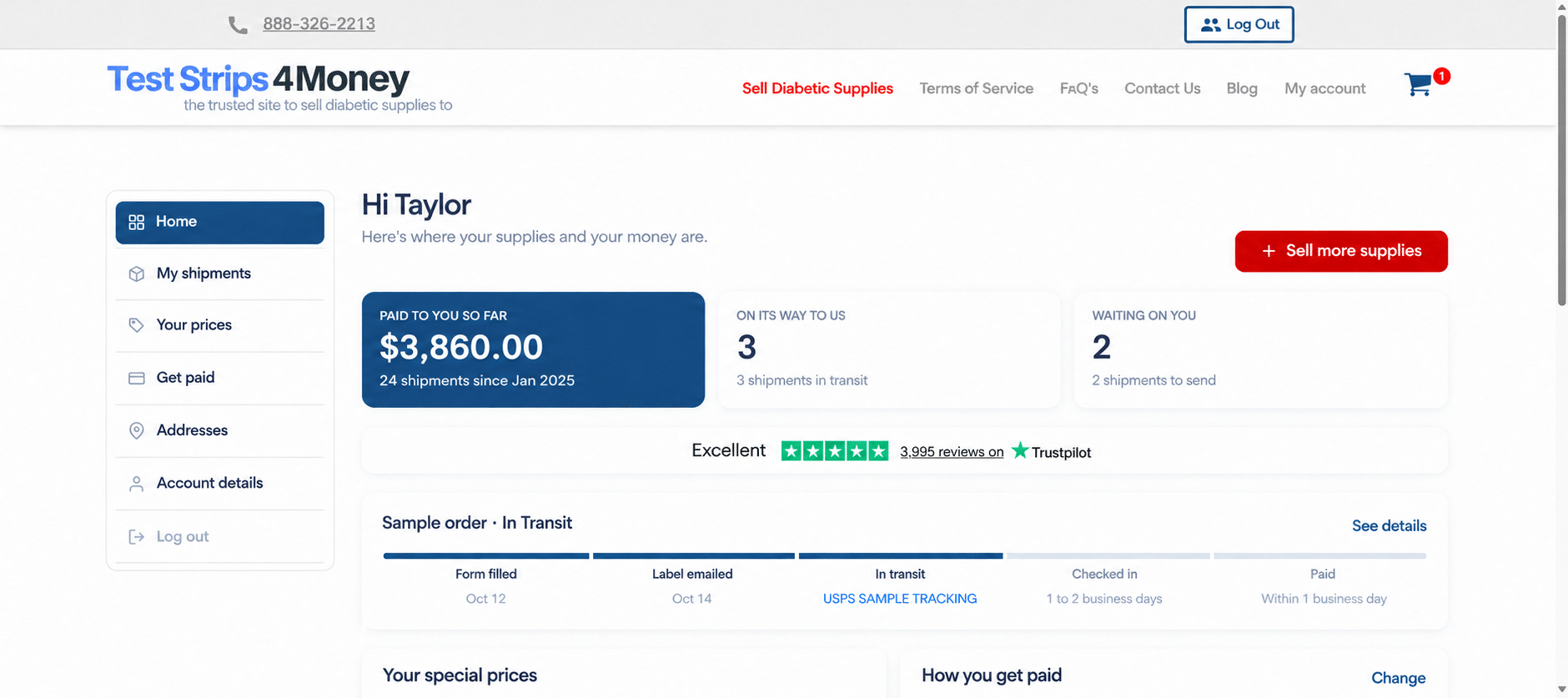
Sample screen. The name, order, price and tracking details are examples.
2. Every shipment in one place
Open My Account and choose Shipments to see every order as a simple card.
The status is written in plain words:
- Waiting for your box
- On its way
- Paid
Open an order to see its full timeline: form filled, label sent, in transit, checked in, and paid. You can also see our notes on each item, including photos when we took them.
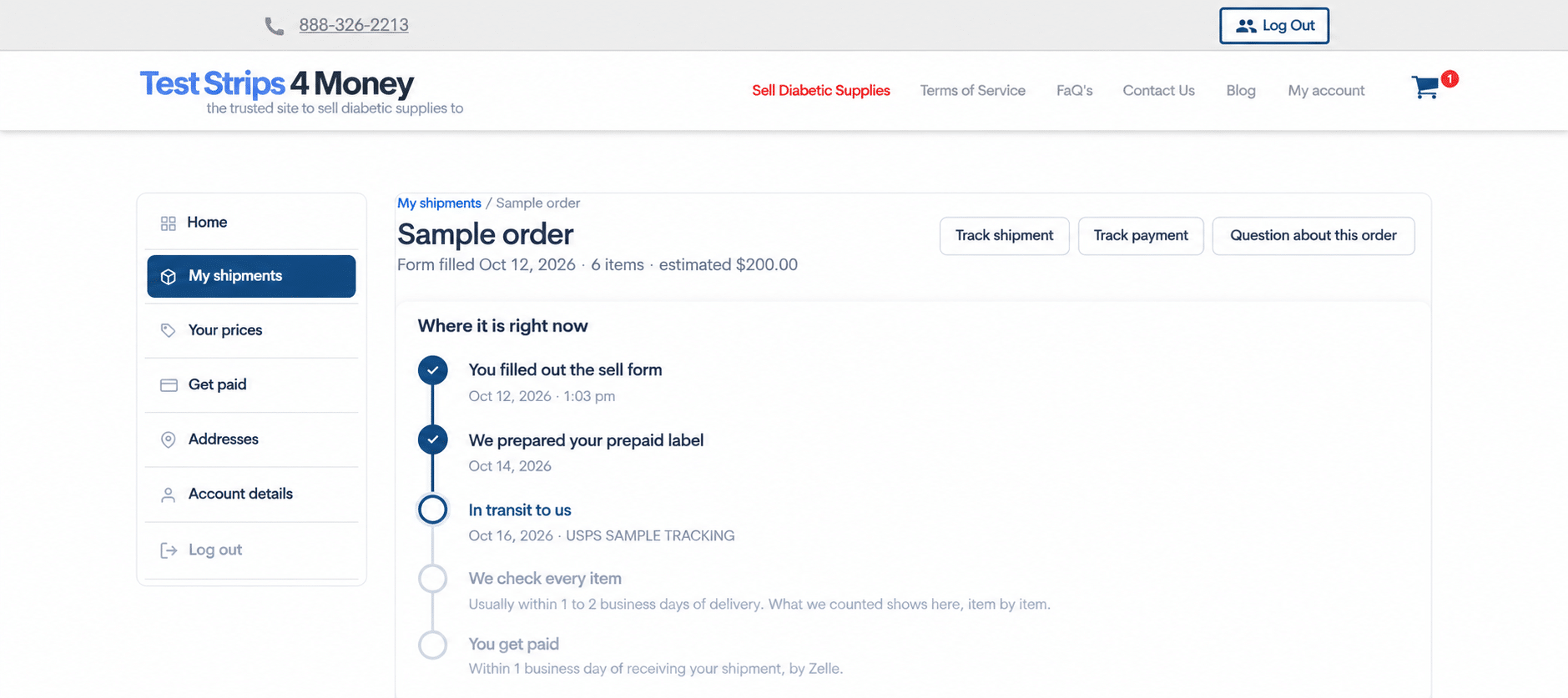
Sample screen. All order details are illustrative.
3. Payments tracked to the dollar
When an order is paid, its timeline shows the amount, date, and method. If the payment includes a bonus, you will see the bonus amount. If the final amount differs from the estimate, you will see the original estimate too.
The Get paid page stores your preferred method for future checkouts and lists earlier payments. You can also print a yearly statement.
You can choose PayPal, Zelle, or a check by mail. PayPal charges the seller a fee on money received. Zelle and checks have no fee. We pay within 1 business day of receiving your shipment.
4. Sell the same items again without starting over
If you regularly sell the same supplies, look for the green Sell again button on a past order.
It shows the price from the earlier order and today’s price. If the price is lower, you must confirm before continuing. If it is higher, you receive the higher price.
You can place the new order with the same address, payment method, and label choice. Or you can change the count, address, or payout before finishing.
5. Edit an order before USPS scans it
Found two more boxes after filling out the form? On eligible unshipped orders, Edit my shipment lets you add or remove items and change quantities.
Your estimate updates, and we send a new confirmation email. Your existing label still works.
This is a new feature with limited use so far. Once USPS scans the shipment, the item list can no longer be changed. If the contents do not match the list, do not worry: we pay for what we receive.
6. A shorter checkout that checks and remembers details
Checkout now has three numbered sections:
- Where the box ships from
- How you want payment
- How you want your prepaid label
If you are signed in, your saved address, payment method, and label choice may already be filled in. You can review the short summary and choose Change only when something is different.
USPS checks the address while you type. It will verify the address, suggest a close match, or ask you to review an address it cannot find. This helps prevent labels and shipping kits from going to the wrong place.
The four label methods are now laid out plainly at checkout: a PDF label, a QR code for people without a printer, a printed label by mail, or a shipping kit. The first three are free. The shipping kit includes a box and label, and $6 is deducted from your payment.
These label methods existed before. What changed is how clearly they are presented and that your label is available in your account as well as by email.
More useful changes
- Emails now follow the shipment from order received through payment.
- PayPal and Zelle details include a clear confirmation before the order is placed.
- The cart saves counts automatically and lets you add several expiration-date ranges to one shipment.
- The phone view has simple tabs for Home, Shipments, Sell, Get paid, and Account.
- The new login and registration pages explain the process before you sign in.
- Some sellers will see an optional Priority Mail upgrade or receive a label for their next shipment. These newer options are not offered to everyone.
See your new account
Log in and look at your Home page. If you are ready to start a shipment, see our current prices for diabetic supplies.
For step-by-step help, read How to Use Your Test Strips 4 Money Account.
Have a question or want to tell us what you think? Contact Test Strips 4 Money or call 888-326-2213.